Source
Flowlyze supports two source integration modes: active and passive. Both allow you to acquire, normalize, and process data consistently within the platform.
There are two ingestion modes:
- Active (pull): Flowlyze fetches data from sources on a schedule or on demand.
- Passive (push): sources send events/messages to endpoints exposed by Flowlyze.
In both cases, data is acquired, normalized, and routed through the same transformation and validation pipelines.
Active Mode (pull)
On a scheduled interval or on demand (via API or manual action in the UI), Flowlyze pulls data from the source and loads it into the internal database. Subsequent processing follows the rules defined in the flow (pipelines, transformations, validations).
Typical sources
- Standard API connectors (REST/JSON).
- Relational or NoSQL databases.
- Flat files (e.g., CSV) from local storage or FTP/SFTP.
Use cases
- Every night at 00:00: import a CSV file from an FTP location.
- Every hour: read a table from an operational database.
When configuring a Source in Flowlyze, you can define, at a general level, the execution recurrence using a cron expression. This feature lets you flexibly and precisely schedule how often the source should be activated (for example every minute, every hour, every day, or at specific times).
You can also specify the integration type used, selecting among the different modes supported by Flowlyze (for example REST API, database, file system, webhook, and so on), so that the Source behavior fits the integration flow requirements.
To simplify use in global contexts, Cron Expression time references are always in UTC (they do not take into account the user's locale or the default time zone chosen for the tenant).
The following image shows the basic configuration of a source scheduled every minute.
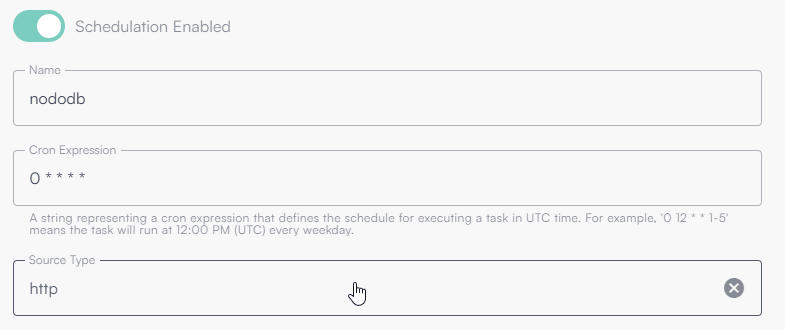
This configuration indicates that the HTTP Source (API call) will run every minute of every hour, every day.
What is a Cron Expression
A cron expression is a string that defines a recurring time schedule. It consists of five or six fields (depending on the system), each representing a time interval:
| Field | Description | Allowed values |
|---|---|---|
| 1 | Minutes | 0–59 |
| 2 | Hours | 0–23 |
| 3 | Day of month | 1–31 |
| 4 | Month | 1–12 or names (JAN–DEC) |
| 5 | Day of week | 0–6 or names (SUN–SAT) |
Cron expression examples
| Cron expression | Meaning |
|---|---|
* * * * * | Every minute |
0 * * * * | Every hour, at minute 0 |
0 0 * * * | Every day at midnight |
0 9 * * 1-5 | Every weekday at 09:00 |
*/15 * * * * | Every 15 minutes |
0 0 1 * * | First day of every month at midnight |
Incremental data handling
Flowlyze provides a built-in memory system that enables incremental reads from data sources, optimizing flow performance and reducing the amount of data processed on each execution.
A discriminating field (timestamp/order) is identified. After each run, the maximum processed value is stored; on the next run, only subsequent records are read. This significantly reduces load on sources and flows.
The mechanism is based on identifying a discriminating field in the source (for example a database column or a field in an HTTP call payload) that represents the sequence or time order of the data.
On each execution, Flowlyze stores the maximum value (or another aggregation criterion) obtained for that field within the processed data set. On the next execution, that value is used as a reference point to request only new records or those modified after the last update.
Example behavior
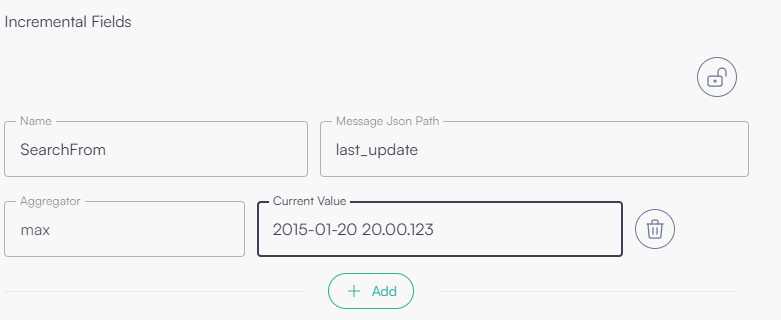
Suppose the source contains a last_update field that represents the last modification date of each record.
On the first execution, Flowlyze processes all available data and records the result of an aggregation operation (generally the maximum last_update value found).
On the next execution, the platform uses that value to query the source, requesting only data with last_update later than the stored value.
This way, the system avoids re-reading already processed data, ensuring efficiency, consistency, and scalability of the flow.
Configuration parameters
Incremental mechanism configuration is fully customizable and lets you define the following fields:
| Field | Description |
|---|---|
| Variable name | Identifies the variable associated with the incremental field. It can be referenced in configurations using the syntax `{{variable_name}}`. |
| Message JSON Path | JSONPath expression that locates, within the message or payload, the discriminating field to use for incremental reading. |
| Aggregator | Aggregation criterion applied to the field to determine the value to store (for example max, min, etc.). In most cases, max is used. |
| Current value | Current stored value for the incremental field. Can be set or modified manually to force a restart from a specific point. |
| Offset | Optional integer applied to the stored value when data is retrieved. It lets you move the incremental starting point forward (positive) or backward (negative). |
The value shown in the UI for Current value does not include the offset. The offset is applied dynamically only when data is retrieved.
The displayed value does not include the offset yet. The offset will be dynamically applied when retrieving the data.
The offset is added to the stored value according to the incremental field type:
| Stored value type | Offset effect |
|---|---|
Date/time (DateTime) | The configured integer is added (or subtracted) as ticks to the stored value |
| Number (integer, decimal, etc.) | The configured integer is added algebraically to the stored value |
If Offset is set but the stored value is neither a date nor a numeric type, data retrieval fails with:
Cannot apply offset to field '{variable_name}'. The value is neither a DateTime nor a numeric type (Current type: {type}).
Offset usage example
Numeric field — stored value 30, offset 5 → value used for the source query: 35.
With offset -5 and stored value 30, the value used would be 25. Useful for re-reading a small window of records already processed.
Date/time field — stored value 2024-06-01T12:00:00, offset -36000000000 (equivalent to −1 hour in .NET ticks) → value used for the query: 2024-06-01T11:00:00. A negative offset on a timestamp lets you move the starting point backward in time and overlap previously processed data.
Configuration example
The following image shows an example configuration that uses the last_update field as the discriminant for incremental reading.
Manual execution
Flowlyze lets you manually start a flow without waiting for its scheduled trigger. Manual execution offers two distinct modes, depending on whether you need to customize the job behavior at runtime.
Run Now (Standard execution)
This is the immediate, direct execution of the flow. The job is instantly queued for processing while keeping the source configuration exactly as saved in the system, without any modifications or added parameters.
Run With Options (Execution with options)
Lets you temporarily override or enrich the flow execution by passing runtime parameters. This mode allows you to:
- Schedule a deferred execution: set a specific date and time in the future to start the flow, within a maximum limit.
- Pass instance variables (
instanceFields): a map of dynamic key/value pairs useful for overriding or populating the source configuration (e.g., inject date ranges or specific IDs for that single run).
Run Now vs Run with Options
| Mode | API endpoint | Body | Behavior |
|---|---|---|---|
| Run Now | POST /api/jobs/{flowId} | (empty) | Immediately queues the scheduled job execution. |
| Run with Options | POST /api/jobs/run/{flowId} | FlowRunOptions | Queues immediately or schedules execution; applies instance variables to the source configuration. |
Requirements
To correctly invoke a manual execution (in both modes), the following requirements must be met:
- Flow configuration: The flow must have a scheduled source (active/pull mode) and the schedule must be enabled (
isScheduleEnable = true). Otherwise, the system returns a400 Bad Requesterror. - Permissions: The user must have the
flows:runpermission. - Context: HTTP calls must include the tenant context (header
x-tenant-id).
User interface usage
On a flow detail page, the Run button exposes a menu with two options:
- Run Now — immediate execution without options.
- Run Now with Options — opens a dialog where the user can configure:
- Next Execution — optional date and time for deferred execution.
- Flow Run Options (
instanceFields) — key/value map of variables to use only for that execution.
Options entered in the panel are stored locally in the browser (per tenant and flow) and automatically repopulated the next time the dialog is opened to speed up repeated testing.
API usage
Run Now endpoint (standard)
| Element | Value |
|---|---|
| Endpoint | https://api.flowlyze.io/api/jobs/{flowId} |
| Method | POST |
| Path parameter | flowId — flow identifier |
| Header | Authorization: Bearer <token>, x-tenant-id: <tenant_id>, Content-Type: application/json |
| Body | Not required (empty) |
Run Now call example
    curl -X POST
    {{API_BASE_URL}}/api/jobs/<FLOW_ID>
    -H "Authorization: Bearer <TOKEN>"
    -H "x-tenant-id: <TENANT_NAME>"
Run with Options endpoint
| Element | Value |
|---|---|
| Endpoint | https://api.flowlyze.io/api/jobs/run/{flowId} |
| Method | POST |
| Path parameter | flowId — flow identifier |
| Header | Authorization: Bearer <token>, x-tenant-id: <tenant_id>, Content-Type: application/json |
| Body | JSON object FlowRunOptions (all internal fields are optional). |
FlowRunOptions model
| Field (JSON) | Type | Required | Description |
|---|---|---|---|
nextExecution | string | No | UTC execution date and time. If omitted, the job is queued immediately. |
instanceFields | object (string -> value map) | No | Runtime variables to inject into the source. They override any global variables. |
The nextExecution field accepts strings in ISO 8601 format with offset indication or in native UTC format (e.g. 2026-06-23T14:30:00Z).
Run with Options call example
    curl -X POST
    {{API_BASE_URL}}/api/jobs/run/<FLOW_ID>
    -H "Authorization: Bearer <TOKEN>"
    -H "x-tenant-id: <TENANT_NAME>"
    -d '{
      "nextExecution": "2026-06-23T22:00:00Z",
      "instanceFields": {
        "bodyOption": "Value of body option"
      }
    }'
Parameters in detail
nextExecution — deferred execution
When nextExecution is set, Flowlyze does not execute the flow immediately: it registers a Hangfire job scheduled for the indicated time.
The execution date cannot exceed a maximum interval relative to the current time (default: 24 hours).
If nextExecution exceeds this limit, it is automatically reduced to the maximum allowed value.
If nextExecution is not set, the job is queued immediately (behavior equivalent to Run Now).
instanceFields — runtime variables
Instance variables are key/value pairs provided at manual run time.
They are merged with the tenant's global variables and used for Handlebars substitution in source configuration fields,
using the same syntax already used elsewhere in Flowlyze: {{variable_name}}.
Use case example
Suppose an HTTP source with URL configured as:
https://api.example.com/orders?from={{dataDa}}&to={{dataA}}
With a Run with Options call that sets:
{
  "instanceFields": {
    "dataDa": "2025-06-01",
    "dataA": "2025-06-23"
  }
}
at execution time the effective URL becomes:
https://api.example.com/orders?from=2025-06-01&to=2025-06-23
Variables in instanceFields are added to the tenant variable dictionary for that single execution.
In case of duplicate keys, the value provided in instanceFields takes priority over the global one.
Passive Mode (push)
Flowlyze exposes an endpoint that external systems call to send data (single records or batches). This is the ideal model for near real-time events.
Protect the endpoint with an API Key and scope its path per tenant. Consider rate limits and message signatures when available.
Use case
- An e-commerce sends an order update via webhook to the Flowlyze REST endpoint.
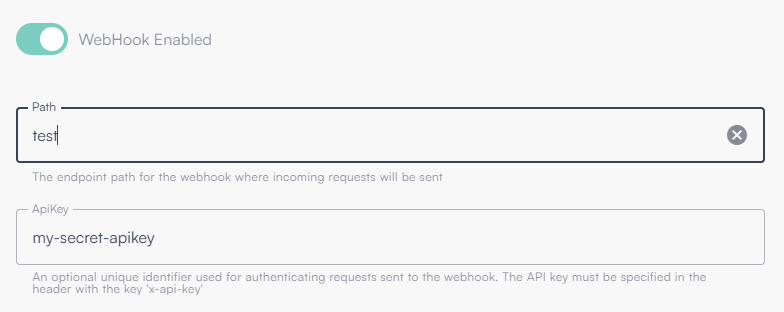
Below is an image showing endpoint activation with path "test" and API key "my-secret-apikey"
Combined modes
Both modes can coexist. The same source can:
- send events in push (webhook) for updates,
- be synchronized in pull on a regular schedule to ensure alignment and consistency.
Unified process
Regardless of the ingress mode (active or passive), all data:
- Is acquired into Flowlyze's internal database.
- Is aggregated and normalized (schema, formats, encodings).
- Follows the same flow of transformation, enrichment, validation, and delivery to the intended destinations.
This approach ensures operational uniformity, traceability, and scalability of data processing.
Http Ingestion (Push)
Endpoint V2
The V2 endpoint lets you define the data model on the client side, freeing the caller from having to conform to a preconfigured schema. In practice, anyone with the URL (Uniform Resource Locator) and API Key can freely choose the payload format, within the supported options.
The parser is automatically chosen based on the MIME type declared in the `Content-Type` header:
- JSON →
`application/json` - XML →
`application/xml,text/xml` - Form →
`application/x-www-form-urlencoded,multipart/form-data`
JSON submission
When the x-fl-selector parameter is indicated, the pointed sub-object is used Optional selector x-fl-selector
If the HTTP query parameter x-fl-selector is present, the endpoint applies the indicated JSONPath expression to locate the sub-object (or list) to process.
If the header is not present, the root object of the JSON body is used. The endpoint automatically detects whether the payload represents a single message (object) or a set of messages (array). JSONPath expressions can select nested elements and lists.
Examples (JSON)
| # | Input (schematic) | Content-Type | x-fl-selector | Interpretation |
|---|---|---|---|---|
| 1 | `[{}, {}, {}]` | application/json | (omitted) | The entire array is a batch: 3 messages. |
| 2 | `{ "data": [ {}, {}, {} ] }` | application/json | data | Selects data: batch of 3 messages. |
| 3 | `[ { "children": [ {}, {}, {} ] }, { "children": [ {}, {}, {} ] }, { "children": [ {}, {}, {} ] } ]` | application/json | $.*.children[*] | Selects and flattens all children: 9 messages. |
Note: examples are intentionally compact and omit application fields; in production each {} represents a complete record/object.
If payload parsing fails, Flowlyze still creates a fallback message containing a content field with the original content received. This ensures traceability and the ability to retry processing downstream.
BatchId submission
The endpoint allows sending one Batch ID per request. Parameters can be provided via header or via query string.
Supported parameters
| Parameter name | Type | Required | Description |
|---|---|---|---|
batchId | string | Yes | Unique batch identifier (ObjectId). Only one value per request is allowed. |
processableBatch | boolean | No | Indicates whether the batch should be processed. |
Processing rules
- If
processableBatch = true→ the batch status is set toPROCESSING - If
processableBatch = falseor not provided → the batch status is set toDATA_LOADING
Endpoint V1
The V1 endpoint, being phased out, relies on a predefined data structure. This means the flow must be configured in advance to correctly interpret the incoming payload. Within the flow you must specify:
The V1 endpoint is deprecated and being retired. Migration to V2 is recommended for flexibility and robustness.
- Consider as single object: whether the endpoint receives a single object
- path: unique URL path (last part of
https://in.flowlyze.io/api/wh/{tenant_id}/{path}) - apikey: unique key to pass in query string or in header with parameter name x-api-key
Example: https://in.flowlyze.io/api/wh/flowlyze-demo/test for tenant flowlyze-demo and path test.
Required parameters in the flow
Consider as single object
Indicates whether the endpoint receives a single JSON object per request (true) or a set of objects (array).
- true → the payload is a single record.
- false → the payload is a list of records.
Path
Unique path at the end of the URL that identifies the webhook instance within the tenant.
Example: in /flowlyze-demo/test, the path is test.
API Key
Unique key required for authentication:
- In query string:
?x-api-key=<KEY> - Or via HTTP header:
x-api-key: <KEY>
URL example
For tenant flowlyze-demo and path test: https://in.flowlyze.io/api/wh/flowlyze-demo/test
Authentication with query string: https://in.flowlyze.io/api/wh/flowlyze-demo/prova?x-api-key=<KEY>
Authentication with HTTP header (recommended), curl example:
curl -X POST \
  https://in.flowlyze.io/api/wh/flowlyze-demo/prova \
  -H "x-api-key: <KEY>" \
  -H "Content-Type: application/json" \
  -d '{ "example": "value" }'
Lifecycle and migration
The V1 endpoint is being phased out. For greater schema flexibility (selectors, formats, batch autodiscovery), migration to Endpoint V2 is recommended, which allows client-side data model definition and supports selection via JSONPath.
Connectors
📄️ HTTP (pull)
An HTTP Source in Flowlyze reads and acquires data from remote endpoints over HTTP/HTTPS, typically exposed by web services, REST APIs, or microservices.
📄️ GraphQL
A GraphQL Source in Flowlyze is a scheduled inbound job that, based on the flow schedule (e.g. cron), calls a GraphQL endpoint, sends a request (query or mutation), and enqueues the response payload for processing.
📄️ RDBMS (SQL)
An RDBMS (SQL) Source connects to relational databases and extracts data using a custom SQL query.
📄️ Flat file
A Flat File Source reads and parses structured files in multiple formats (CSV, positional, XML, JSON) from various acquisition channels (FTP, HTTP, S3, Azure Blob Storage).
📄️ MongoDB
A MongoDB Source in Flowlyze reads data from MongoDB using a connection string and configurable queries.