Source
Flowlyze supports two ways to ingest data from sources: active (pull) and passive (push). Both let you acquire, normalize, and process data consistently across the platform.
There are two ingestion modes:
- Active (pull): Flowlyze fetches data from sources on a schedule or on demand.
- Passive (push): sources send events/messages to endpoints exposed by Flowlyze.
In both cases, data is acquired, normalized, and sent through the same transformation and validation pipelines.
Active Mode (pull)
On a schedule or on demand (via API or manual action in the UI), Flowlyze pulls data from the source and loads it into the internal database. Subsequent processing follows the rules defined in the flow (pipelines, transformations, validations).
Typical sources
- Standard API connectors (REST/JSON)
- Relational/NoSQL databases
- Flat files (e.g., CSV) from local storage or FTP/SFTP
Use cases
- Every night at 00:00: import a CSV file from an FTP location
- Every hour: read a table from an operational database
When configuring a Source, you can define a global recurrence using a cron expression.
This lets you precisely schedule how often the source should run (every minute, hourly, daily, or at specific times).
You can also specify the integration type used by Flowlyze (e.g., REST API, database, file system, webhook) so that the Source behavior fits the flow requirements.
All Cron Expression times are in UTC (independent of user locale or tenant default time zone).
The following image shows a source scheduled every minute.
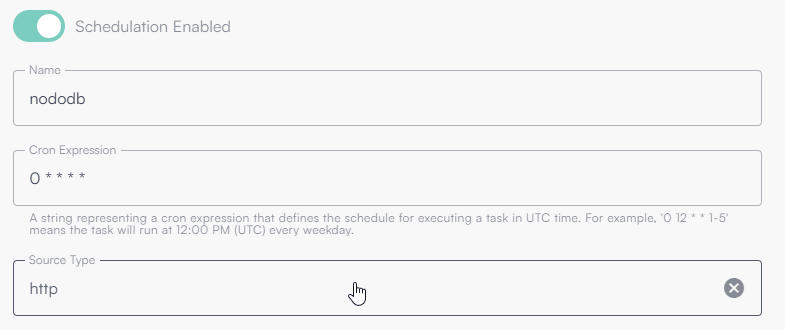
This configuration means an HTTP Source (outbound API call) will run every minute of every hour, every day.
What is a Cron Expression
A cron expression defines a recurring schedule.
It consists of five or six fields (depending on the system), each representing a time component:
| Field | Description | Allowed values |
|---|---|---|
| 1 | Minutes | 0–59 |
| 2 | Hours | 0–23 |
| 3 | Day of month | 1–31 |
| 4 | Month | 1–12 or names (JAN–DEC) |
| 5 | Day of week | 0–6 or names (SUN–SAT) |
Cron expression examples
| Cron expression | Meaning |
|---|---|
* * * * * | Every minute |
0 * * * * | Hourly at minute 0 |
0 0 * * * | Every day at midnight |
0 9 * * 1-5 | Weekdays at 09:00 |
*/15 * * * * | Every 15 minutes |
0 0 1 * * | First day of the month at midnight |
Incremental reads
Flowlyze provides a built-in memory that enables incremental reads, improving flow performance and reducing the amount of processed data.
Choose a discriminating field (timestamp/order). After each run, Flowlyze stores the max processed value; at the next run it only reads records after that value. This significantly reduces load on sources and flows.
The mechanism is based on identifying a discriminating field in the source (e.g., a database column or an HTTP payload field) that represents sequence or time order.
On each execution, Flowlyze stores the maximum (or another aggregate) value observed for that field.
On the next execution, that value is used as a reference to request only new or updated records.
Example behavior
Assume the source has a last_update field.
During the first run, Flowlyze processes all available data and stores the aggregate value (typically the maximum last_update).
On the next run, Flowlyze queries only records with last_update later than the stored value.
This avoids re-reading already processed data, ensuring efficiency, consistency, and scalability.
Configuration parameters
| Field | Description |
|---|---|
| Variable name | Identifies the variable bound to the incremental field. Can be referenced using `{{variable_name}}`. |
| Message JSON Path | JSONPath expression pointing to the discriminating field to use for incremental reading. |
| Aggregator | Aggregate used to select the value to store (e.g., max, min, etc.). Most commonly max. |
| Current value | The current stored value; can be set/overridden manually to restart from a specific point. |
Configuration example
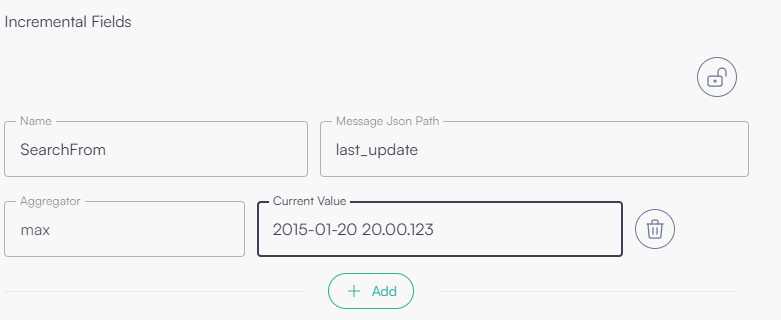
The following image shows a configuration that uses last_update as the incremental field.
Passive Mode (push)
Flowlyze exposes an endpoint that external systems can call to send data (single records or batches). This is ideal for near real-time event ingestion.
Protect the endpoint with an API Key and scope its path per tenant. Consider rate limits and message signatures when available.
Use case
- An e-commerce sends an order update via webhook to the Flowlyze REST endpoint
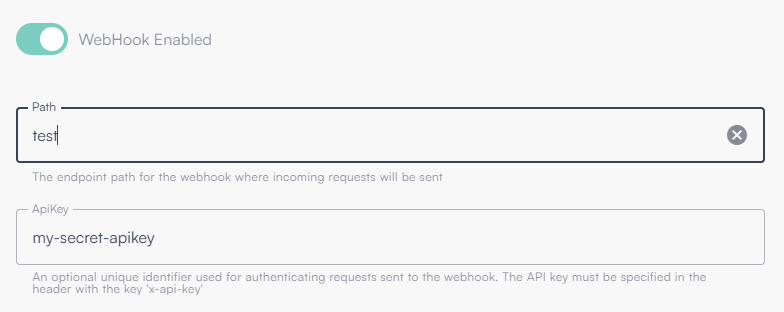
Below is an example of enabling an endpoint with path “test” and API key “my-secret-apikey”.
Combined modes
Both modes can coexist. The same source can:
- send updates in push (webhook), and
- be synchronized in pull periodically to ensure alignment and consistency.
Unified process
Regardless of the ingress mode (active or passive), all data:
- Is acquired into Flowlyze’s internal database
- Is aggregated and normalized (schema, formats, encodings)
- Follows the same flow of transformation, enrichment, validation, and delivery to destinations
This ensures operational uniformity, traceability, and scalability.
Http Ingestion (Push)
Endpoint V2
The V2 endpoint allows you to define the data model on the client side, removing the need to conform to a preconfigured schema. Anyone with the URL and API Key can pick the payload format among supported options.
The parser is automatically chosen based on the Content-Type header:
- JSON →
application/json - XML →
application/xml,text/xml - Form →
application/x-www-form-urlencoded,multipart/form-data
JSON payload
If the x-fl-selector query parameter is provided, the endpoint uses the pointed sub-object
If the HTTP query parameter x-fl-selector is present, the endpoint applies the given JSONPath expression to select the sub-object (or list) to process.
If the header is missing, the root object of the JSON body is used. The endpoint automatically detects whether the payload is a single message (object) or a batch (array). JSONPath expressions can select nested elements and lists.
Examples (JSON)
| # | Input (schematic) | Content-Type | x-fl-selector | Interpretation |
|---|---|---|---|---|
| 1 | `[{}, {}, {}]` | application/json | (omitted) | The whole array is a batch: 3 messages. |
| 2 | `{ "data": [ {}, {}, {} ] }` | application/json | data | Selects data: batch of 3 messages. |
| 3 | `[ { "children": [ {}, {}, {} ] }, { "children": [ {}, {}, {} ] }, { "children": [ {}, {}, {} ] } ]` | application/json | $.*.children[*] | Selects and flattens all children: 9 messages. |
Note: examples are compact and omit business fields; each {} represents a complete record/object in production.
If payload parsing fails, Flowlyze still creates a fallback message containing a content field with the original payload for traceability and potential downstream retries.
BatchId submission
The endpoint allows sending one Batch ID per request. Parameters can be provided via HTTP headers or via query string.
Supported parameters
| Parameter name | Type | Required | Description |
|---|---|---|---|
batchId | string | Yes | Unique batch identifier (ObjectId). Only one value per request is allowed. |
processableBatch | boolean | No | Indicates whether the batch should be processed. |
Endpoint V1
The V1 endpoint (being phased out) relies on a predefined schema. The flow must be configured in advance to correctly interpret the incoming payload.
Within the flow you must specify:
V1 is deprecated and being retired. Migrate to V2 for flexibility and robustness.
- Consider as single object: whether the endpoint receives a single object
- path: unique URL tail (last part of
https://in.flowlyze.io/api/wh/{tenant_id}/{path}) - apikey: key passed either as query string or header
x-api-key
Example: https://in.flowlyze.io/api/wh/flowlyze-demo/test for tenant flowlyze-demo and path test.
Required parameters in the flow
Consider as single object
Whether the endpoint receives a single JSON object per request (true) or a list of objects (array).
- true → payload is a single record
- false → payload is a list of records
Path
Unique tail at the end of the URL identifying the webhook instance within the tenant.
Example: in /flowlyze-demo/test, the path is test.
API Key
Unique key required for authentication:
- Query string:
?x-api-key=<KEY> - HTTP header:
x-api-key: <KEY>
URL examples
For tenant flowlyze-demo and path test: https://in.flowlyze.io/api/wh/flowlyze-demo/test
Authentication via query string: https://in.flowlyze.io/api/wh/flowlyze-demo/prova?x-api-key=<KEY>
Authentication via HTTP header (recommended), curl example:
curl -X POST \
  https://in.flowlyze.io/api/wh/flowlyze-demo/prova \
  -H "x-api-key: <KEY>" \
  -H "Content-Type: application/json" \
  -d '{ "example": "value" }'
Lifecycle and migration
V1 is being phased out. For schema flexibility (selectors, formats, batch autodiscovery), migrate to V2, which lets clients define the data model and supports JSONPath selection.
Http
An HTTP Source in Flowlyze reads and acquires data from remote endpoints over HTTP/HTTPS, typically exposed by web services, REST APIs, or microservices.
Data is processed as JSON, the standard for structured inter-system exchange.
Advanced HTTP Source configurations let you flexibly control many aspects of integration.
Incremental reading (Delta Reading)
Configure the HTTP source to perform incremental reads, i.e., only new or changed data since the last run.
This uses Flowlyze’s memory and reduces transferred data volume.
Payload parsing
Define parsing and transformation rules for incoming JSON using JSONPath expressions to identify fields, extract portions of data, or reshape the message for the downstream flow.
Supported authentication modes
OAuth2 (Bearer Token)
What it does: obtains an access token from an Authorization Server and sends it as Authorization: Bearer <token>.
When to use: modern enterprise/public APIs (OpenAPI), strong security, token expiry/rotation, scopes/permissions.
Typical Flowlyze config
- Grant type: commonly Client Credentials for server-to-server (or Authorization Code for interactive users)
- Token URL: OAuth2 endpoint (e.g.,
https://auth.example.com/oauth/token) - Client ID / Client Secret
- Scope (optional)
- Outbound header:
Authorization: Bearer {{access_token}}(inserted automatically)
Custom JWT Bearer
What it does: builds a signed JWT (typically RS256) with agreed claims and either sends it directly as Bearer or exchanges it for an access token at a custom endpoint.
When to use: proprietary APIs requiring a signed JWT instead of a standard OAuth token, or a custom “JWT → access token” flow.
Typical Flowlyze config
-
Algorithm: RS256/ES256/HS256 (usually RS256)
-
Private key / Key ID (kid)
-
Claims:
iss,sub,aud,iat,exp, plus custom claims -
Token emission:
- Direct Bearer: send JWT as
Authorization: Bearer <jwt> - Exchange: send JWT to an endpoint to obtain an access token, then use as Bearer
- Direct Bearer: send JWT as
Final header example (direct bearer)
Authorization: Bearer eyJhbGciOiJSUzI1NiIsInR5cCI6IkpXVCJ9...
Basic Auth
What it does: sends username:password Base64-encoded in the Authorization header.
When to use: legacy/internal services exposing Basic Auth over HTTPS.
Typical Flowlyze config
- Username
- Password
- Outbound header (automatic)
Note: Always use HTTPS; otherwise Basic Auth credentials are exposed.
API Key
What it does: sends a static key as header or query string.
When to use: simple/public services where OAuth is not required.
Typical Flowlyze config
- Key value
- Location:
Header(e.g.,x-api-key: <key>) orQuery(e.g.,?apikey=<key>)
Complete example
https://api.example.com/data?filter=update_date>{{last_update}}
The {last_update} placeholder is set by Flowlyze with the last stored incremental value (e.g., max update_date).
If the API returns this structure:
{
  "data": [{}, {}, {}]
}
Use data as the selector for records to ingest.
GraphQL
A GraphQL Source in Flowlyze is a scheduled inbound job that, based on the flow schedule (e.g. cron), calls a GraphQL endpoint, sends a request (query or mutation), and enqueues the response payload for processing. It extends the behavior of HTTP sources and uses the flow’s GraphQL settings to build the request, send it, and interpret the response.
It allows executing GraphQL operations against endpoints accessible via HTTP: the client specifies the desired data, and the server responds with a JSON structure that mirrors the request. The typical transport is HTTP (usually POST) with a JSON body.
Configuration
| Property | Description |
|---|---|
| Url | Full URL of the GraphQL endpoint (e.g. https://api.example.com/graphql). Cannot be empty. |
| Method | HTTP method: GET or POST. |
| Query | GraphQL query (or mutation) string. Cannot be empty. |
| Variables | JSON string containing the query variables. |
| OperationName | Name of the operation when the document contains multiple operations. |
| Headers | HTTP headers added to the request (e.g. Authorization, X-Custom-Header). |
| HttpRequestAuthSettings | Authentication configuration (e.g. bearer token, API key). |
| DataField | JSON path for the data field in the GraphQL response (JSONPath). Used to extract the payload to be enqueued. |
| ErrorsField | JSON path for the errors array in the response. If present and not empty, the job raises an exception with the error messages. |
Response handling
A GraphQL endpoint response is typically in JSON format.
- HTTP errors: if the HTTP status is not 2xx (e.g. 400, 401, 403, 429, 500), the request is considered failed and an exception is raised (including status, body, and error message).
- GraphQL errors: the job reads the token specified by ErrorsField (default
"errors"). If it is a non-empty array, it collects the message from each element and raises:"Error in GraphQL: {messages}". - Extensions: if the root object contains an
extensionstoken, it is logged at an informational level (e.g. rate limits, query cost). - Data extraction: the token specified by DataField (default
"data") is used to build the list of messages: - Array: each element (as a JObject) is enqueued as a separate message.
- Object: a single JObject is enqueued as one message.
Authentication
Authentication is handled in the same way as for the HTTP Source: Bearer token, API key, Basic Auth, OAuth2, JWT, etc. (See the Http section for supported authentication methods.)
RDMBS
An RDBMS (SQL) Source connects to relational databases and extracts data using a custom SQL query.
Use it when data resides in enterprise databases and must be read incrementally, parametrically, or transactionally.
The query can be:
- a simple SELECT, with joins and predicates
- a stored procedure that handles business logic server-side
You can use global variables or incremental parameters (e.g., {{last_update}}) resolved dynamically by Flowlyze.
Connection
| Field | Description |
|---|---|
| DB Engine | Database engine (MySQL, PostgreSQL, Oracle, MSSQL). Drivers and SQL dialect adapt automatically. |
| Host | Database hostname or IP. |
| Port | Port (3306 MySQL, 5432 PostgreSQL, 1433 MSSQL, 1521 Oracle). |
| Database | Database/schema name. |
| Username | User with read (and proc) permissions. |
| Password | Use secrets for security. |
Data selection query
Any database-supported statement is allowed. Flowlyze sends the query as read-only or procedure call, depending on the syntax.
Use:
- global variables (
{{variable}}) - incremental fields (e.g.,
{{last_update}}) - limits/pagination to optimize data reading
Examples
-- 1. Import all orders
SELECT * FROM orders;

-- 2. Only orders updated after the last incremental value
SELECT *
FROM orders
JOIN customers ON orders.customer_id = customers.id
WHERE order_update > {{last_update}}
LIMIT 1000;

-- 3. Stored procedure returning and acknowledging data
SELECT * FROM getOrdersAndAcknowledge();
💡 Variables like {{last_update}} are resolved at runtime, enabling incremental/contextual logic.
Acknowledge query (TBD)
You can configure an acknowledge query executed only after the data has been successfully received and confirmed within Flowlyze.
It receives the processed set (fetchedData) and can:
- update processed flags (e.g.,
processed = true) - log synchronization
- run custom confirmation procedures
Example:
{{#set "ids"}}{{#each fetchedData}}{{this.id}}{{#unless @last}},{{/unless}}{{/each}}{{/set}}

UPDATE orders
SET processed = TRUE
WHERE id IN ({{ids}});
-- e.g., WHERE id in (1,2,3,4)
This ensures records are marked “read” only after the end-to-end processing, avoiding loss or duplication.
Flat File
A Flat File Source reads and parses structured files in multiple formats (CSV, positional, XML, JSON) from various acquisition channels (FTP, HTTP, S3, Azure Blob Storage).
Each row or logical unit becomes an independent message processed asynchronously for maximum scalability and flexibility.
Acquisition channels
| Channel | Description |
|---|---|
| FTP / FTPS / SFTP | Securely download files from an FTP server. Auth via user/password or SSH key; paths, filename patterns, retention rules supported. |
| HTTP (TBD) | Download from HTTP/HTTPS with possible authentication (API key, Basic, Bearer). |
| Amazon S3 (TBD) | Connect to a bucket and filter by prefix or filename. |
| Azure Blob Storage (TBD) | Access a container; auth via connection string or service principal. |
| Azure Blob Storage RFE | Extended variant for multi/coordination processing (in development). |
Reading protocols
Flowlyze supports two reading protocols:
Coordinated
Flowlyze uses a working directory with read/write permissions:
- Copy file from source directory to a temporary processing directory
- Read and parse contents
- Move file to a completion directory on finish
Advantages:
- Visibility on pending files
- Error inspection
- Full traceability
Directory cleanup and artifact handling are the user’s responsibility.
Simple (TBD)
Flowlyze downloads and processes the file directly, without local copies.
On errors, Flowlyze emits a flow error message with details but does not keep a copy of the original file.
Supported formats
| Format | Status | Description |
|---|---|---|
| CSV | Implemented | Delimited files with advanced parsing (header, quoting, culture, custom delimiters). |
| Positional | TBD | Fixed-width files with explicit column positions. |
| XML | TBD | XML with XPath selectors, node mapping. |
| JSON | TBD | Complex JSON with JSONPath entity selection. |
CSV configuration
| Parameter | Description |
|---|---|
| Line Delimiter | Usually \n or \r\n. |
| Column Delimiter | Default ,; e.g., ;. |
| Quote Character | Default ". |
| Culture | Number/date culture (e.g., it-IT, en-US). |
| Has Header | First row contains column names (true/false). |
| Grouping Column | Column used to group multiple rows into a single message. |
Row Grouping
Flowlyze can group multiple source rows into one logical message using a grouping column.
This is useful for hierarchical relations or multiple versions of the same record in a file.
During parsing, Flowlyze evaluates the grouping column (e.g., product_id, record_id).
Rows with the same value are aggregated into one JSON object.
Each group yields a single message containing common fields and a nested array with grouped rows.
Example 1 – Variants grouped by main product
CSV with product variants (size, color, price) associated with a main product identified by product_id.
Source file
| product_id | variant_id | color | size | price |
|---|---|---|---|---|
| 1001 | 1 | red | M | 29.90 |
| 1001 | 2 | blue | L | 31.50 |
| 1002 | 3 | black | S | 28.00 |
Grouping column: product_id
Aggregated output
{
  "product_id": 1001,
  "variants": [
    { "variant_id": 1, "color": "red", "size": "M", "price": 29.90 },
    { "variant_id": 2, "color": "blue", "size": "L", "price": 31.50 }
  ]
},
{
  "product_id": 1002,
  "variants": [
    { "variant_id": 3, "color": "black", "size": "S", "price": 28.00 }
  ]
}
Example 2 – Grouping multiple saves (journaling tables)
A journaling/audit table records multiple versions of the same record. The flow can consolidate them into one logical message.
Source file
| record_id | update_time | field | old_value | new_value |
|---|---|---|---|---|
| 501 | 2025-10-01 10:30:00 | status | draft | pending |
| 501 | 2025-10-02 11:45:00 | status | pending | approved |
| 501 | 2025-10-03 09:20:00 | note | null | "OK" |
Grouping column: record_id
Aggregated output
{
  "record_id": 501,
  "data": [
    {
      "update_time": "2025-10-01T10:30:00Z",
      "field": "status",
      "old_value": "draft",
      "new_value": "pending"
    },
    {
      "update_time": "2025-10-02T11:45:00Z",
      "field": "status",
      "old_value": "pending",
      "new_value": "approved"
    },
    {
      "update_time": "2025-10-03T09:20:00Z",
      "field": "note",
      "old_value": null,
      "new_value": "OK"
    }
  ]
}
In this example, Flowlyze emits one message per record_id, containing the complete change history in chronological order. This consolidates versions into a coherent representation for downstream systems (e.g., data lake, CRM, or auditing service).
JSON Configuration
For the JSONformat, Flowlyze supports reading structured JSON files, both simple and complex, with the ability to select a specific portion of the document using JSONPath.
The JSON configuration is intentionally minimal: the parsing behavior mainly depends on the structure of the selected node (object, array, or single value).
Configuration Parameters
| Parameter | Description |
|---|---|
| Json Path | JSONPath expression that identifies the node in the JSON document from which to read data. If not specified, left empty, or set to "$", the document root is used. |
Parsing Behavior
Once the target node is determined (root or node selected via JSONPath), Flowlyze generates one or more messages based on the node type:
| Node Type | Result |
|---|---|
| JSON Object | A single message is generated containing the entire object. |
| JSON Array | One message per array element is generated. |
| Single Value (string, number, boolean, etc.) | A single message is generated containing the value. |
This behavior is identical whether using the document root or a JSONPath.
Usage Without Json Path
If Json Path is not configured or is set to "$":
- The entire JSON file is read.
- The document root is used as the input node.
- Message generation depends on the root type:
- Object → 1 message
- Array → N messages (one per element)
Usage With Json Path
When Json Path is specified:
- The file is parsed as JSON.
- The JSONPath expression is applied to locate a specific node (for example, a nested array or object).
- If the path does not match any node, a configuration error is raised.
- The selected node becomes the input for message generation, following the same rules described above.
Configuration Examples
JSON Object as Root
{ "id": 1, "name": "Example" }
Configuration:
- Json Path: (not set)
Result:
- A single message is generated containing the complete JSON object.
JSON Array as Input
[
  { "id": 1 },
  { "id": 2 }
]
Configuration:
- Json Path: (not set)
Result:
- Two messages are generated, one for each array element.
Selection via Json Path
{
  "data": {
    "items": [
      { "id": 1 },
      { "id": 2 }
    ]
  }
}
Configuration:
- Json Path:
$.data.items
Result:
- Two messages are generated, , one for each element of the
itemsarray.
Invalid Json Path
Configuration:
- Json Path:
$.missing.path
Result:
- Configuration error: the JSONPath does not match any node in the document.