Custom Flowlyze Adapter
This package is used to make available a new template on Visual Studio (or dotnet CLI) to use as a starting base for creating a custom adapter.
The package ID is Ipaas.Adapter.Template.
To download the package click here
Installation
To install the template, navigate to the same folder as the .nupkg file and run the command:
dotnet new install <PACKAGE_TEMPLATE_NAME>.nupkg
At the end of the command, you will already be able to create projects with this template: open Visual Studio and search for the newly installed template with the name Ipaas Adapter:
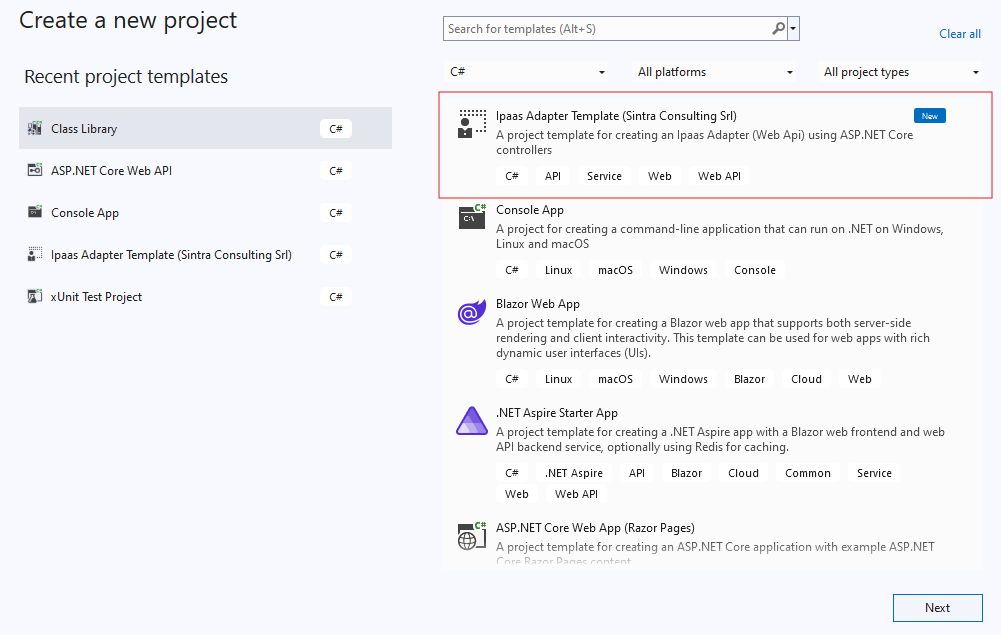 .
.
To uninstall the template:
dotnet new uninstall Ipaas.Adapter.Template
Dependencies
This template is based on .NET8 and uses the following NuGet packages:
Newtonsoft.Json: used for serialization and deserialization of JSON objectsSwashbuckle.AspNetCore: used to have a graphical interface for testing APIsAspNetCore.Authentication.ApiKey: used for authentication via API Key
Structure
Let's briefly describe the template structure
Authentication
The implemented authentication is based on API Key: by default, the key value is read from a configuration file with key ApiKey and as header it checks for the presence of the x-api-key key, but it is possible to implement the logic you prefer.
To change this logic, simply modify the ApiKeyProvider.cs file present in the Auth folder.
Controller
There is an example Egress-type controller, which implements receiving a message and returns the response as Flowlyze expects. Basically, the structure of an Egress endpoint will always be the same:
- Check message consistency
- Skip messages not to be processed
- Message processing
- Return response
The Ingress-type controller is empty as it can be implemented according to needs and can return any data.
Services
Inside there is an example service that implements the business logic to process the received message.
There is also validation logic to show how errors for each individual message must be handled: this logic must be used for every type of problem, not just validation.
We also find the use of a class that represents the headers that may be present in the call from Flowlyze to the adapter.
Example request
Inside the solution there is an ExampleRequest.http file with which you can directly execute example calls to the adapter with everything preconfigured (url, apikey, message)
The call result will show a response that contains two messages: one with success and one with error.